
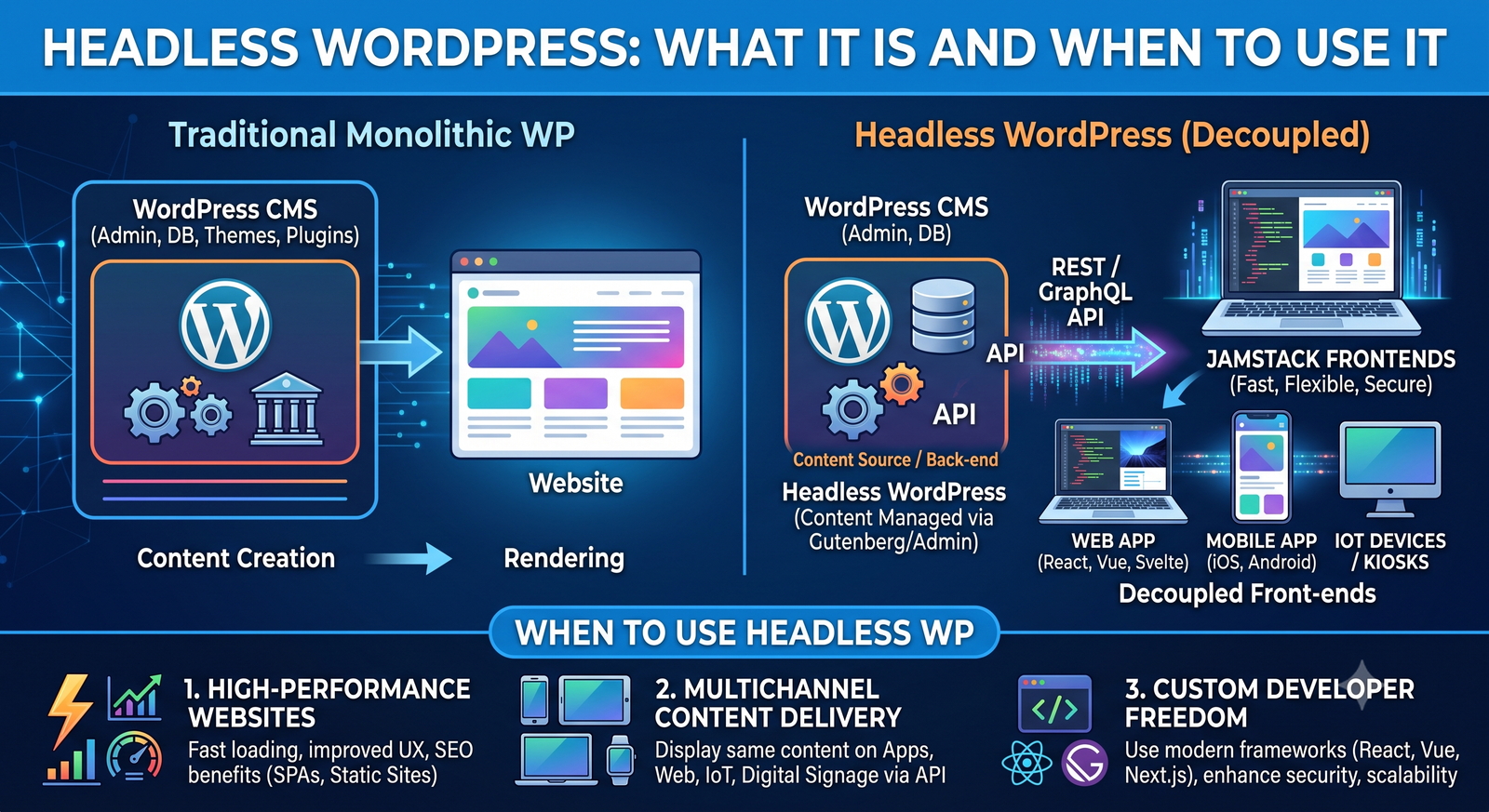
WordPress is usually thought of as a complete website platform. You log in to the dashboard, create pages and posts, choose a theme, install plugins, and WordPress takes care of displaying everything in a browser.
But what if you want to use WordPress for managing content without using WordPress to actually display that content?
That is the basic idea behind headless WordPress.
With a headless setup, WordPress remains the content management system, while the front end is built separately using technologies such as React, Next.js, Vue, or another framework. WordPress provides content through an API, and the front end decides how that content is presented to visitors.
This approach can give development teams more control over performance, user experience, and how content is delivered across different platforms. At the same time, it introduces additional complexity that makes it unnecessary for many websites.
So, is headless WordPress right for your project?
The answer depends on what you are trying to build, how your team works, and whether the benefits of separating the front end from WordPress justify the extra development effort.
What Is Headless WordPress?
Headless WordPress is a WordPress setup where the WordPress backend and the website’s frontend are separated.
In a traditional WordPress website, WordPress handles both sides:
Visitor
   ↓
WordPress
   ↓
Theme + Plugins
   ↓
Web Page
WordPress stores the content and also generates the HTML that visitors see.
In a headless setup, the architecture looks different:
Content Editors
      ↓
WordPress
      ↓
WordPress API
      ↓
Frontend Application
      ↓
Website / App / Other Experience
WordPress handles content management, while another application handles the user interface.
The two systems communicate through an API.
For example, an editor might create a blog post in WordPress. Instead of WordPress automatically rendering that post using a PHP theme, the frontend application requests the post through the WordPress REST API and displays it using its own components.
This is why the approach is often called decoupled WordPress. The content management system and presentation layer are independent rather than being tightly connected.
Traditional WordPress vs Headless WordPress
The biggest difference is where the frontend is controlled.
| Traditional WordPress | Headless WordPress |
|---|---|
| WordPress manages content and presentation | WordPress primarily manages content |
| Uses WordPress themes | Uses a separate frontend |
| Frontend and backend are closely connected | Frontend and backend are separated |
| Usually simpler to build | Usually requires more development |
| WordPress plugins can directly affect the frontend | Frontend often needs API-compatible integrations |
| PHP themes are commonly used | React, Next.js, Vue, or other technologies can be used |
| Good for many conventional websites | Useful for specialized digital experiences |
Neither approach is automatically better.
A small business website may gain little from going headless. A large content platform with a custom application, multiple digital channels, or demanding frontend requirements may benefit considerably.
How Does Headless WordPress Work?
A headless WordPress project usually has at least two major parts.
1. WordPress Backend
WordPress continues to provide the familiar administration experience.
Editors can create and manage:
- Blog posts
- Pages
- Categories
- Tags
- Images
- Custom post types
- Author information
- Other structured content
The important difference is that WordPress does not necessarily control how that content appears to users.
2. Separate Frontend
The frontend is developed independently.
For example, a team might use:
- React
- Next.js
- Vue
- Nuxt
- Svelte
- A custom JavaScript application
The frontend requests data from WordPress and turns that data into pages and interactive components.
A simplified request might look like this:
Frontend
   ↓
Request content
   ↓
WordPress API
   ↓
WordPress database
   ↓
JSON response
   ↓
Frontend renders the content
The visitor generally does not need to know that WordPress is sitting behind the application.
What Is the WordPress REST API?
The WordPress REST API is one of the technologies that makes headless WordPress possible.
It allows external applications to communicate with WordPress using HTTP requests and receive content in a structured format, commonly JSON.
For example, a frontend could request posts from a WordPress installation with an API endpoint similar to:
/wp-json/wp/v2/posts
The response contains information about the requested content.
A frontend application can then process that data and decide what to display.
Conceptually:
fetch("https://example.com/wp-json/wp/v2/posts")
  .then(response => response.json())
  .then(posts => {
    console.log(posts);
  });
The exact implementation will depend on the project, but the important concept is simple: WordPress provides the content, and the separate frontend consumes it.
The WordPress API is therefore an important part of many headless CMS architectures.
Headless CMS Architecture Explained
A typical headless CMS architecture separates content management from presentation.
In a traditional setup:
CMS
 ├── Content
 ├── Templates
 ├── Plugins
 └── Frontend
In a headless architecture:
                 ┌── Website
                 │
WordPress ─ API ─┼── Mobile App
                 │
                 ├── Web Application
                 │
                 └── Other Digital Experience
The same content can potentially be delivered to different interfaces.
For example, imagine a publishing company that maintains hundreds of articles.
The editorial team could continue using WordPress to manage those articles. A web application could retrieve the content through the API, while another application could consume the same content for a different digital experience.
This separation can make the content layer more reusable.
Why Use Headless WordPress?
There are several reasons a company might choose a headless approach.
Greater Frontend Flexibility
Traditional WordPress themes provide a well-established way to build websites, but they also shape how the frontend is developed.
A headless setup gives developers much more freedom.
Instead of building within a WordPress theme, they can choose a frontend framework and create the interface around the project’s specific requirements.
This can be particularly useful when the website behaves more like a web application than a conventional content website.
More Control Over the User Experience
With the frontend separated from WordPress, developers have greater control over:
- Page layouts
- Navigation
- Interactive components
- Animations
- Application behavior
- Data fetching
- Rendering strategies
This does not automatically make a website faster or better. Poorly designed headless applications can still have performance problems.
However, the architecture gives developers more control over how the frontend is built.
Modern Frontend Technologies
A headless approach allows teams to use modern frontend development tools without giving up WordPress as their content management system.
For example, a company may have an existing WordPress editorial workflow but want to build its public website using React and Next.js.
Instead of replacing WordPress completely, the company can use WordPress as the content backend and build a separate frontend.
Reusing Content Across Experiences
One of the biggest conceptual advantages of a headless CMS is content reuse.
The same content can potentially be consumed by:
- Websites
- Web applications
- Mobile applications
- Digital displays
- Internal tools
- Other services
The implementation depends on the API and application architecture, but the basic idea is that content does not have to be tied to one specific presentation layer.
When Should You Use Headless WordPress?
Headless WordPress is not necessary for every website.
It becomes more interesting when a project has requirements that are difficult or inconvenient to satisfy with a traditional WordPress architecture.
1. You Need a Highly Custom Frontend
If the website requires a highly customized application-like experience, a separate frontend can make development more flexible.
For example, consider an online learning platform.
WordPress could manage:
- Courses
- Articles
- Instructor profiles
- FAQs
- Educational resources
Meanwhile, the frontend could provide a custom learning interface with interactive lessons, dashboards, progress tracking, and other application features.
In such a project, separating the content layer from the application layer may make sense.
2. You Already Have a Strong Frontend Development Team
Headless WordPress tends to make more sense when developers are comfortable working with APIs and modern frontend frameworks.
If your team already works with React, Next.js, Vue, or similar technologies, using WordPress purely as a content platform can be a practical option.
On the other hand, if your team primarily relies on WordPress themes and plugins, a headless migration can introduce a significant learning curve.
3. You Need Multiple Frontends
Suppose an organization wants to manage content centrally but deliver it through several applications.
A headless approach can provide a common content source.
For example:
                 ┌── Corporate Website
                 │
WordPress ───────┼── Customer Portal
                 │
                 ├── Mobile App
                 │
                 └── Internal Application
Each application can consume the content through an API while maintaining its own interface.
4. Your Website Is Becoming More Like an Application
A standard company website may not need headless architecture.
But as functionality becomes more application-oriented, the advantages of a dedicated frontend can become more relevant.
Examples might include:
- Personalized dashboards
- Complex search interfaces
- Interactive product configurators
- Customer portals
- Data-heavy applications
- Membership platforms
- Interactive publishing platforms
The important question is not whether headless technology is modern. It is whether the project’s requirements justify separating the systems.
When Should You Avoid Headless WordPress?
There are equally good reasons not to use it.
Small Business Websites
If a business needs a straightforward website with pages, contact forms, blog posts, and a few integrations, traditional WordPress is often easier to maintain.
Going headless can add development work without solving a meaningful problem.
Simple Blogs
A traditional WordPress blog already provides everything needed for publishing content.
If the primary goal is to publish articles efficiently, a headless setup may add unnecessary complexity.
Projects With Limited Development Resources
A traditional WordPress site can often be managed by a smaller team.
A headless project typically requires people who understand:
- WordPress
- APIs
- Frontend frameworks
- Hosting
- Deployment
- Caching
- Authentication
- API security
- Frontend performance
That does not mean every headless project requires a large team, but the technical responsibilities are generally broader.
Heavy Dependence on WordPress Plugins
This is one of the biggest considerations.
Many WordPress plugins are designed with traditional WordPress websites in mind.
A plugin may work perfectly when WordPress controls the frontend but provide little value in a headless environment.
For example, a plugin that modifies a WordPress theme’s output may not automatically affect a separate React application.
The same applies to some SEO, form, search, membership, and page-building functionality.
Before choosing headless WordPress, review the plugins your project depends on and determine whether their functionality can work with your chosen frontend.
Headless WordPress and SEO
SEO is often one of the first concerns developers have when discussing headless WordPress.
The good news is that a headless website can be built with strong SEO foundations.
The challenge is that your development team becomes responsible for implementing many frontend SEO details that traditional WordPress themes often handle for you.
These can include:
- Page titles
- Meta descriptions
- Canonical URLs
- Structured data
- XML sitemaps
- Robots directives
- Open Graph metadata
- Internal linking
- Proper heading structure
- Crawlable URLs
- Redirects
Server-side rendering or static generation can also be important depending on the frontend architecture.
For example, frameworks such as Next.js provide different rendering approaches that can help developers build search-friendly websites.
The key point is that headless WordPress does not automatically improve SEO.
SEO depends on how the entire application is designed and implemented.
Headless WordPress and Website Performance
Performance is another common reason developers consider headless architecture.
A separate frontend can provide more control over:
- JavaScript delivery
- Image handling
- Caching
- Code splitting
- Rendering
- Asset loading
- CDN usage
- Data fetching
However, headless architecture itself is not a performance guarantee.
A poorly implemented frontend can load large JavaScript bundles, make too many API requests, or delay important content.
For example:
Bad implementation:
Page → API request → API request → API request → Render

Better architecture:
Page → Efficient data request → Render
Caching, appropriate rendering strategies, optimized assets, and sensible API usage still matter.
Performance should therefore be treated as an implementation concern rather than an automatic benefit of going headless.
Headless WordPress vs Traditional WordPress
The choice becomes easier when you focus on project requirements instead of technology trends.
| Factor | Traditional WordPress | Headless WordPress |
|---|---|---|
| Setup | Simpler | More involved |
| Frontend flexibility | Moderate to high | Very high |
| Development complexity | Lower | Higher |
| WordPress themes | Core part of frontend | Usually not used for frontend |
| Plugin compatibility | Generally strong | Must be evaluated |
| Frontend technology | Mostly WordPress/PHP-based | Any suitable frontend stack |
| Content reuse | Possible | Central design principle |
| Maintenance | Often simpler | Requires more technical coordination |
| Custom applications | Possible | Often well suited |
| Small websites | Often appropriate | May be unnecessary |
| Multiple digital experiences | Less natural | Strong use case |
The right choice depends on the project’s actual requirements.
What Does a Headless WordPress Tech Stack Look Like?
A headless WordPress project can use many different technologies.
A common example might look like this:
Content Management:
WordPress

API:
WordPress REST API

Frontend:
Next.js / React

Hosting:
Cloud hosting platform

Database:
MySQL

CDN:
Content delivery network
Another project might use Vue instead of React or a completely different frontend technology.
There is no single required headless WordPress stack.
The important architectural principle is the separation between content management and presentation.
How Headless WordPress Development Works
The development process usually begins with content modeling.
Instead of thinking only about pages, developers and content teams identify the actual content types the application needs.
For example:
Product
 ├── Name
 ├── Description
 ├── Images
 ├── Price
 └── Categories

Article
 ├── Title
 ├── Author
 ├── Content
 ├── Featured Image
 └── Publication Date
WordPress stores this structured information.
The frontend then requests the required data through the API.
Developers build components that turn the data into user interfaces.
For example:
WordPress
   ↓
Article API
   ↓
Frontend
   ↓
Article component
   ↓
Browser
This workflow requires developers to think about content as structured data rather than simply as HTML pages.
Common Challenges With Headless WordPress
The flexibility of headless architecture comes with trade-offs.
More Development Work
You are effectively building and maintaining two connected systems.
The WordPress backend has its own hosting, updates, plugins, users, and security considerations.
The frontend has its own codebase, deployment process, dependencies, and performance concerns.
More Complex Debugging
When something goes wrong, the problem might exist in several places.
For example:
WordPress data
      ↓
API
      ↓
Frontend data fetching
      ↓
Frontend component
      ↓
Browser
A missing piece of content could be caused by WordPress configuration, API permissions, frontend code, caching, or something else.
Plugin Limitations
As mentioned earlier, not every WordPress plugin is designed for headless use.
This should be investigated before committing to the architecture.
More Infrastructure Decisions
A traditional WordPress site can be relatively straightforward to host.
A headless application may involve separate hosting environments for the CMS and frontend, API caching, deployment pipelines, environment variables, monitoring, and additional services.
For larger teams, that flexibility can be useful. For a small project, it may be unnecessary overhead.
Is Headless WordPress Worth It?
There is no universal answer.
Headless WordPress can be a strong architectural choice when you need a flexible frontend, a highly customized user experience, multiple content consumers, or an application-oriented website.
But if you are building a conventional business website, blog, portfolio, or marketing site, traditional WordPress may provide a simpler path.
A useful way to think about the decision is:
Do you need WordPress?
        ↓
      Yes
        ↓
Do you need a highly independent/custom frontend?
        ↓
   ┌────┴────┐
   No        Yes
   ↓          ↓
Traditional   Consider
WordPress     Headless
The goal should not be to use headless architecture simply because it is modern.
The goal should be to choose an architecture that fits the product.
Frequently Asked Questions
Is headless WordPress still WordPress?
Yes. WordPress can continue to manage content, users, media, and other CMS functionality. The main difference is that another application handles the frontend.
Is headless WordPress faster?
It can be, but it is not automatically faster. Performance depends on frontend architecture, rendering, caching, API usage, assets, hosting, and many other implementation details.
Can I use React with WordPress?
Yes. React can be used as a separate frontend that consumes content from WordPress through an API.
Is the WordPress REST API required for headless WordPress?
Not necessarily. The WordPress REST API is a common option, but other API approaches can also be used depending on the project.
Is headless WordPress difficult to maintain?
It generally requires more technical maintenance than a conventional WordPress website because the CMS and frontend are separate systems.
Can headless WordPress use WordPress plugins?
Some plugins can still be useful, but compatibility depends on what the plugin does. Plugins that rely heavily on WordPress themes or server-rendered frontend behavior may require alternative implementations.
Can headless WordPress be used for ecommerce?
Yes, although ecommerce introduces additional architectural considerations such as products, carts, checkout, payments, customer accounts, and order management. The specific implementation depends on the ecommerce platform and integrations involved.
Final Thoughts
Headless WordPress changes the role WordPress plays in a website.
Instead of asking WordPress to manage both content and presentation, you can use it primarily as the content layer and build the frontend separately.
That separation can provide significant flexibility. Developers can use modern frontend technologies, create highly customized experiences, and potentially deliver the same content across multiple applications.
But flexibility comes with complexity.
A headless CMS architecture requires more development, more infrastructure decisions, and careful consideration of APIs, performance, SEO, security, and plugin compatibility.
For a simple website, traditional WordPress may be the more practical choice.
For a complex digital product where the frontend needs to operate independently from the CMS, headless WordPress can be a powerful approach.
The most important question is therefore not “Should every WordPress website become headless?”
It is:
“Does separating the content layer from the frontend solve a real problem for this project?”
If the answer is yes, headless WordPress may be worth exploring. If the answer is no, keeping WordPress’s traditional architecture may save development time and make the website easier to operate.